

Simple and efficient civil design tools
Provides you with a full featured Civil Design application on top of BricsCAD.


Civil Site Design was originally developed to provide Civil 3D users with more efficient and automated road design tools. From there is has evolved to be a fully-fledged Civil Design tool, working across multiple CAD platforms.
Civil Site Design is developed by the team at Civil Survey Solutions with offices in Melbourne, Sydney and Brisbane.
Key Benefits
Civil Site Design provides the following benefits:
- Design and draughting are integrated. Design changes can automatically flow through to draughting updates.
- Modern software that provides a dynamic relationship between objects. Make a change and Civil Site Design automatically coordinates the change to related objects.
- A single program. Civil Site Design includes surface tools, alignments, road and pipe tools all in one easy to learn package.
- Powerful visualisation tools. The model viewer allows you to visualise your design in real time. Design changes are immediately updated in the viewer. You can drape aerial images over your surface, incorporate buildings and vehicles, line marking, signage, and view line checks.
- Share the model with your clients allowing them to visualise and interrogate the design.
- Excellent support via the Civil Survey Solutions support system. Support is provided by experienced application engineers who know what is involved when working on real world projects.
Civil Site Design offers the following benefits to your CAD platform:
- On Civil 3D it provides powerful automation tools to speed up the design process and delivery of design documentation. It works bidirectionally with Civil 3D, taking design input from Civil 3D objects, then outputting your design changes back to Civil 3D objects. It can also produce a fully functional corridor for those customers wishing to use existing Civil 3D profiles and cross section outputs or who need to participate in the BIM cycle.
- On MAP3D and AutoCAD it provides a comprehensive Civil Design platform.
- On BricsCAD Pro it runs as a complete Civil Design application, runs faster, and provides a considerable cost saving (more than 45%).
The application interface and functionality are the same on all, meaning users can largely disregard the underlying CAD application. This provides you with a great deal of flexibility and choice in how you meet your Company’s Civil Design Requirements.
Platforms
Civil Site Design is available for:
- AutoCAD Civil 3D 2022 - 2026
- AutoCAD 2022 - 2026
- BricsCAD Pro (min.) V22 - V26
Civil Site Design Plus is also available for those without an existing CAD application. This product is built on AutoCAD OEM.

Introductory Video
Videos
Civil Site Design V22.10 Release Highlights
This release highlights shows some of the major updates to existing features and new design tools to improve your productivity
Kamo Shared Path - Civil Site Design Showcase
Civil Site Design Project example for the Whangarei District Council
Request A Trial
Screenshots


Request A Demo
If you'd like a demo, then please complete the form below and we'll be in touch with you to arrange a suitable time.
BricsCAD Licensing and Pricing
It's your choice.
Whether you prefer Perpetual or Subscription licenses, need different license levels, or want to choose between single‑user and network deployments, BricsCAD gives you the freedom to select the option that best fits your budget and your workflow requirements. The choice is yours!
In addition to single stand‑alone licenses, BricsCAD also offers flexible Network License options. A Network License allows you to share BricsCAD seats among multiple users on your network, making it ideal for organisations with multiple casual or part‑time users, or for those wanting to centralise BricsCAD license management.
Management is straightforward, and you can make BricsCAD available to as many users as required. Network users can also “check out” a license for offline use, enabling continued work away from the office. While the upfront cost of a network license is higher than a single‑user seat, the ongoing cost per user can be significantly lower when shared across several team members.
Pricing (exc. GST)
Perpetual Licenses: Perpetual licenses are just that. Pay once and continue to use for as long as you have a system to support it. Maintenance is mandatory for all new license purchases for the first year. Annual maintenance is optional from the second year on and is the most cost-effective way to keep your BricsCAD up to date.
Subscription Licenses: Prefer a subscription based option? That’s available too.
Single licenses give you ultimate flexibility in how you utilise BricsCAD and is well suited to individuals and smaller organisations. Feel free to contact us to discuss your options.

Network licenses allows you to share a seat of BricsCAD across multiple users on your company network and can be very cost effective. Management is simple, and you can make BricsCAD available to as many users as you like. There are some additional requirements needed to use a Network license, so we recommend that you talk to us to confirm that it will work for you.
All prices are GST exclusive.
* Price is inclusive of maintenance & support. This is mandatory for the first year for perpetual licenses.
† Price is for 5 seats. New BricsCAD Lite network licenses are only available to purchase in increments of 5 seats.
Perpetual license pricing includes the 1st year of maintenance support.
Maintenance is recommended but optional for perpetual licenses from the 2nd year on to keep your license up-to-date.
Subscription license pricing includes support.
Students and Academic institutes can register to use BricsCAD for *FREE*
Looking for an Upgrade or Network license options?
Get in touch, we can advise you and provide a quote.

We have partnered with Procuret to provide clients with the option of spreading the cost of purchase into manageable monthly payments.
Licensing and Pricing
Civil Site Design Licenses are PERMANENT, they do not expire. You are free to continue using your license for as long as you wish, no matter whether you have a maintenance contract or not. Maintenance contract holders are entitled to an additional home use license. In addition to single stand-alone licenses, Civil Site Design is also as available as a network license. This provides a cost-effective way to share a Civil Site Design license across multiple users.
Pricing (exc. GST)
Permanent Licenses: Permanent licenses are just that. Pay once and continue to use for as long as you have a system to support it. Maintenance is mandatory for all new license purchase for the first year. Annual maintenance is optional from the second year on and is the most cost-effective way to keep your Civil Site Design up to date.
Rental Licenses: Prefer a Rental (subscription) based option? That’s available too.
All prices are GST exclusive.
* Price is inclusive of the first year of maintenance.
We have partnered with Procuret to provide clients with the option of spreading the cost of purchase into manageable monthly payments.
Licensing and Pricing
Stringer Topo Licenses are PERMANENT, they do not expire. You are free to continue using your license for as long as you wish, no matter whether you have a maintenance contract or not. Maintenance contract holders are entitled to an additional home use license. In addition to single stand-alone licenses, Civil Site Design is also as available as a network license. This provides a cost-effective way to share a Civil Site Design license across multiple users.
In addition to single stand-alone licenses, Stringer Topo is also as available as a network license. A network licenses allows you to share Stringer Topo amongst users that only need access on a casual basis. Initial purchase is slightly dearer than a stand-alone license, but ongoing costs can be significantly less.
Pricing (exc. GST)
Permanent Licenses: Permanent licenses are just that. Pay once and continue to use for as long as you have a system to support it. Maintenance is mandatory for all new license purchase for the first year. Annual maintenance is optional from the second year on and is the most cost-effective way to keep your Civil Site Design up to date.
Rental Licenses: Prefer a Rental (subscription) based option? That’s available too.
All prices are GST exclusive.
* Price is inclusive of the first year of maintenance.
We have partnered with Procuret to provide clients with the option of spreading the cost of purchase into manageable monthly payments.
Training & Support
Civil Site Design has a comprehensive online training course available to get you started. Civil Survey Solutions run regular Webcast events where they focus on particular Civil Site Design features and usage scenarios. Every webcast is recorded and made available after on their YouTube channel. Civil Survey Solutions - If you have more specific needs, then Civil Survey Solutions offer personalised project base training via the web. Web training is recorded, allowing you to review the session where and when you want.
Bespoke Software Support
We provide bespoke CAD software support services and ongoing support contracts.
Training
Training on all aspects of BricsCAD usage can be provided through one of our standard training course options or it can be tailored to meet your company’s specific needs.
About BricsCAD
You can find out more about BricsCAD from the following sources:
Find out all the details on the latest release along with an indication on the future roadmap. Be sure to check out the breakout sessions for in depth details on new features and functionality.
Access a detailed feature comparison between the various BricsCAD levels as well as AutoCAD®.
Bricsys has long provided a great deal of detail on what has been added, fixed, or improved with the latest BricsCAD update. Well worth a look as part of any new install or upgrade.
Add-on Modules
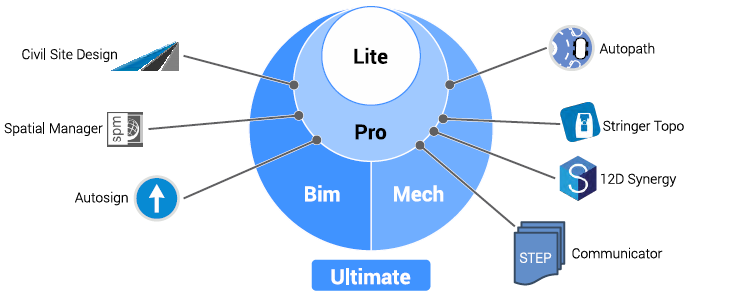
One of the key benefits of BricsCAD is that it has a wealth of Add-on modules to extend its capabilities and plugins to connect it with other applications. Furthermore, many of these 3rd party applications have been ported from AutoCAD® to run with the same features and functionality on BricsCAD. We are a partner for the following Add-ons:
Communicator for BricsCAD
Extends the Import/Export capabilities to add support for the common Mechanical CAD(MCAD) file formats, such asSTEP, SolidWorks, Inventor, and Catia.


Frequently Asked Questions
More CAD Software

.jpeg)
Ready to Transform Your CAD Workflow?
Contact us today to discover how CAD Concept's first-rate support and expert training can elevate your design process.